Applications open · Limited seats ·

Trafy AI Engineer Cohort · Applications open

Stop watching tutorials.
Start shipping
AI products.chatbots.RAG apps.AI agents.

An intensive 8-week programme that takes you from your first line of Python to a deployed AI application. You won’t just sit and learn. You’ll build four projects and an individual capstone, live, with instructors.

Apply to the Cohort

No coding experience required. Starts from Python fundamentals.

32+
live hours
5
real builds
16
live classes
8
weeks

“Learning should not end with attending classes. It should lead to building, execution and opportunities.”

  • Structured technical learning
  • Hands-on implementation from week 4
  • Individual capstone you present
  • Discovered through Trafy’s network

Not a lecture series

Four weeks of learning. Then you build every week.

You begin implementing from Week 4. Each project builds on the last, so you finish with a portfolio, not just notes and a certificate.

  1. Week 4

    AI Chatbot

    LLMs, prompt engineering, APIs

  2. Week 5

    Full-Stack AI Application

    FastAPI, databases, Streamlit

  3. Week 6

    AI Knowledge Assistant

    Embeddings, vector databases, RAG

  4. Weeks 7–8

    Individual Capstone

    Your own AI product, deployed and presented

Capstone ideas: AI Resume Analyzer · AI Study Companion · AI Customer Support Assistant · AI Personal Finance Assistant · AI Research Assistant · AI Document Intelligence System · AI Workflow Automation App. Or propose your own, with mentor approval.

The curriculum

8 phases. 16 classes. One working AI app.

Open any phase to see every class, topic and practical.

01 Programming FoundationsWeek 1 · Classes 01 & 02 · 4 live hours

Class 01 · 2 hours live

Introduction to AI Engineering

  • Introduction to Artificial Intelligence
  • AI vs Machine Learning vs Deep Learning
  • Introduction to Generative AI
  • What does an AI Engineer do?
  • How modern AI applications work
  • Introduction to Large Language Models
  • Understanding the AI engineering ecosystem
  • Setting up Python, VS Code, Google Colab and GitHub

You build: Build your first simple AI-powered application

Class 02 · 2 hours live

Python Fundamentals, Part 1

  • Introduction to Python
  • Variables and data types
  • Operators and expressions
  • Input and output
  • Conditional statements
  • Loops and iterations
  • Writing basic Python programmes

You build: Build a calculator and a number-guessing application

02 Python and Data HandlingWeek 2 · Classes 03 & 04 · 4 live hours

Class 03 · 2 hours live

Python Fundamentals, Part 2

  • Functions and reusable code
  • Lists, tuples, dictionaries and sets
  • String manipulation
  • File handling
  • Exception handling
  • Modules and packages
  • Virtual environments

You build: Build a Python-based file-processing application

Class 04 · 2 hours live

Python for Data Science

  • Introduction to data analysis
  • NumPy fundamentals
  • Pandas fundamentals
  • Reading and processing CSV files
  • Data cleaning
  • Missing values and duplicates
  • Data manipulation
  • Introduction to Matplotlib
  • Basic data visualisation

You build: Analyse and visualise a real-world dataset

03 Machine Learning FoundationsWeek 3 · Classes 05 & 06 · 4 live hours

Class 05 · 2 hours live

Introduction to Machine Learning

  • What is Machine Learning?
  • How machines learn from data
  • Supervised and unsupervised learning
  • Features and labels
  • Training and testing datasets
  • Regression and classification
  • Introduction to model evaluation

Class 06 · 2 hours live

Building Machine Learning Models

  • Introduction to Scikit-learn
  • Linear regression
  • Classification models
  • Decision trees
  • Model training and prediction
  • Accuracy, precision and recall
  • Model evaluation

You build: Build a basic prediction model (project preparation)

04 Generative AI and LLM EngineeringWeek 4 · Classes 07 & 08 · 4 live hours Project 1

Class 07 · 2 hours live

Generative AI and Large Language Models

  • Introduction to Generative AI
  • Understanding Large Language Models
  • How LLMs work
  • Transformers and attention mechanisms (conceptual)
  • Tokens and context windows
  • Embeddings and vector representations
  • Model providers and inference
  • Understanding hallucinations and limitations

Class 08 · 2 hours live

Prompt Engineering and LLM APIs

  • Fundamentals of prompt engineering
  • System and user prompts
  • Zero-shot and few-shot prompting
  • Structured outputs and JSON responses
  • Connecting LLMs through APIs
  • API keys and environment variables
  • Error handling
  • Streaming responses
Project 1
Build an AI Chatbot

Build an AI-powered chatbot using an LLM API and apply prompt engineering techniques.

05 AI Application DevelopmentWeek 5 · Classes 09 & 10 · 4 live hours Project 2

Class 09 · 2 hours live

Backend Development with FastAPI

  • Frontend and backend architecture
  • Introduction to APIs
  • REST API fundamentals
  • HTTP methods and status codes
  • Requests and responses
  • Building APIs using FastAPI
  • Pydantic and data validation
  • Connecting LLMs to backend applications
  • Testing APIs using Swagger UI

Class 10 · 2 hours live

Databases and AI Interfaces

  • Database fundamentals
  • Introduction to SQL
  • PostgreSQL basics
  • Storing and retrieving application data
  • Introduction to Streamlit
  • Connecting frontend interfaces with backend APIs
  • Building interactive applications
  • Storing conversation history
Project 2
Build a Full-Stack AI Application

Build an AI application with a user interface, backend API and database integration.

06 RAG and Knowledge-Based AIWeek 6 · Classes 11 & 12 · 4 live hours Project 3

Class 11 · 2 hours live

Embeddings and Vector Databases

  • What are embeddings?
  • Semantic search vs keyword search
  • Vector similarity
  • Cosine similarity
  • Document chunking
  • Embedding generation
  • Introduction to FAISS and ChromaDB
  • Storing and retrieving vector representations

Class 12 · 2 hours live

Retrieval-Augmented Generation (RAG)

  • What is RAG?
  • Why do AI applications need RAG?
  • RAG architecture
  • Document ingestion
  • Retrieval and context construction
  • Connecting retrieved information to LLMs
  • Introduction to LangChain
  • Source references and reducing hallucinations
Project 3
Build an AI Knowledge Assistant

Build a document-based AI assistant that processes uploaded documents and answers questions using RAG.

07 AI Agents and AutomationWeek 7 · Classes 13 & 14 · 4 live hours Capstone

Class 13 · 2 hours live

AI Agents and Tool Calling

  • What are AI agents?
  • Chatbots vs AI agents
  • Function calling and tool calling
  • Connecting external APIs
  • Giving AI access to tools
  • Multi-step task execution
  • Agent memory and state
  • Understanding agent limitations

Class 14 · 2 hours live

AI Workflows and Automation

  • AI-powered workflows
  • Sequential and conditional workflows
  • Multi-step automation
  • Introduction to LangGraph
  • Human-in-the-loop systems
  • Workflow reliability
  • Error handling and execution
Capstone
Capstone development begins

Identify a real-world problem and begin designing your own AI application.

08 Deployment and Capstone ExecutionWeek 8 · Classes 15 & 16 · 4 live hours Capstone

Class 15 · 2 hours live

Deployment and Production Fundamentals

  • Local development vs production
  • Git and GitHub, version control
  • Environment variables
  • API security fundamentals
  • Deploying AI applications
  • Cloud hosting fundamentals
  • Testing and debugging
  • Logging and monitoring
  • Token and cost optimisation

Class 16 · 2 hours live

Capstone Presentation and Evaluation

  • Final application demonstration
  • Application architecture explanation
  • Project documentation
  • GitHub repository presentation
  • Deployment demonstration
  • Technical feedback
  • Portfolio development
  • Showcasing projects on Trafy
Capstone
Final deliverable

An individual, working AI application, presented by you.

Included with your cohort

So much more, free.

Your cohort seat comes with access to the Trafy platform, not just the classroom.

Free access

30+ free courses on the Trafy app

Learn alongside the live classes with free access to 30+ courses on the Trafy app, at no extra cost.

Free access

Employability Index test

Take the Trafy Employability Index test and get a verified score you can show to employers.

A professional Trafy profile

Showcase your projects and progress to students, professionals, founders and recruiters on Trafy.

A GitHub portfolio

Four practical projects and an individual capstone, all in repositories you can present.

Real product exposure

Contribute to Trafy’s social networking platform and see how real products are built.

Presentation experience

Demo your architecture, code and deployment, and get technical feedback from instructors.

How the cohort runs

An intensive platform, built around execution.

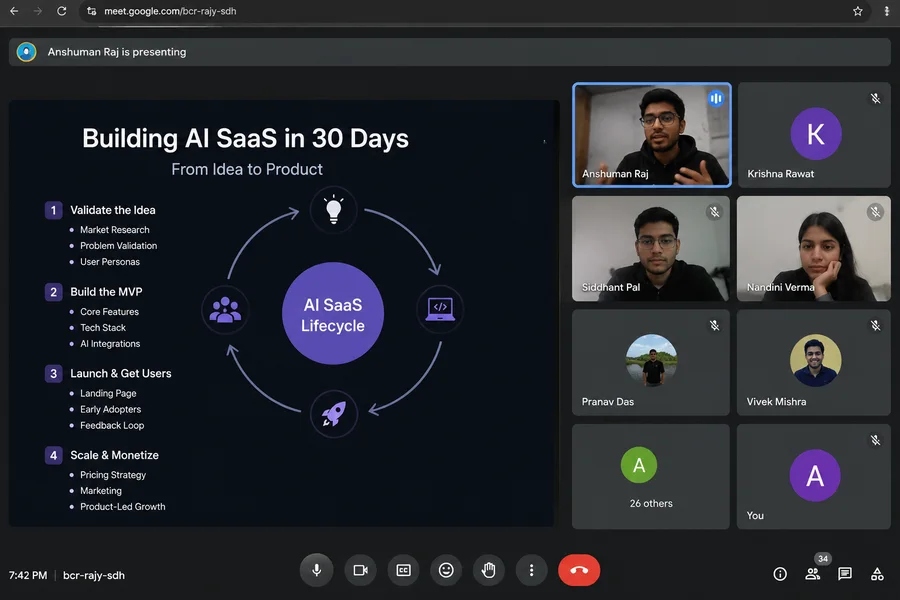
A live Trafy class on building AI SaaS, with the instructor presenting and students on video
01

Live classes every week

Two hours each, instructor-led, with a practical in nearly every class.

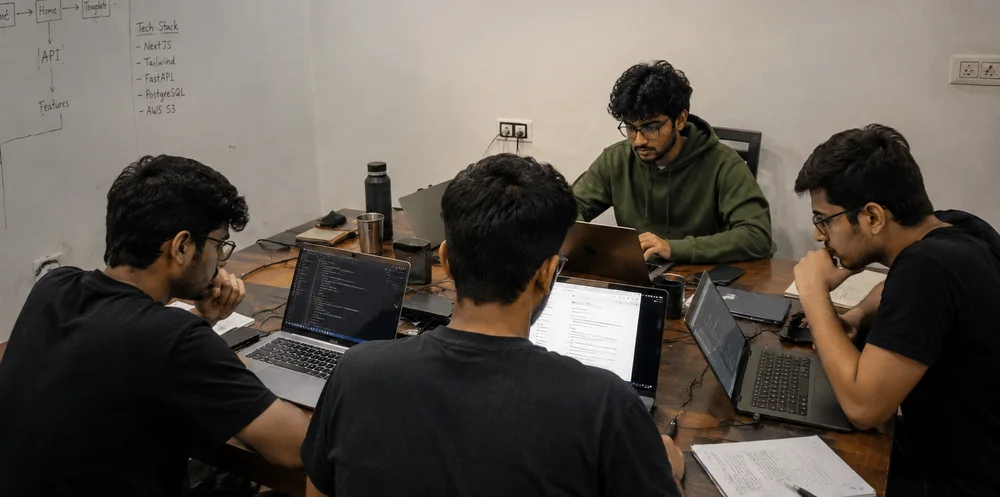
Trafy students building projects together on laptops
02

Build alongside your peers

Weekly assignments and GitHub commits are proof of real technical work.

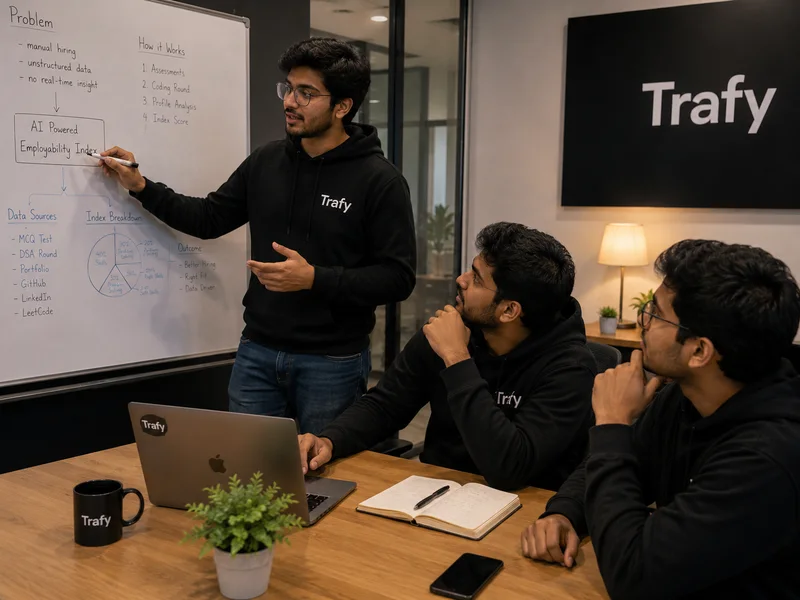
A Trafy mentor at a whiteboard explaining an AI architecture to two students
03

Feedback from mentors

Talk through your architecture and get technical feedback on your capstone.

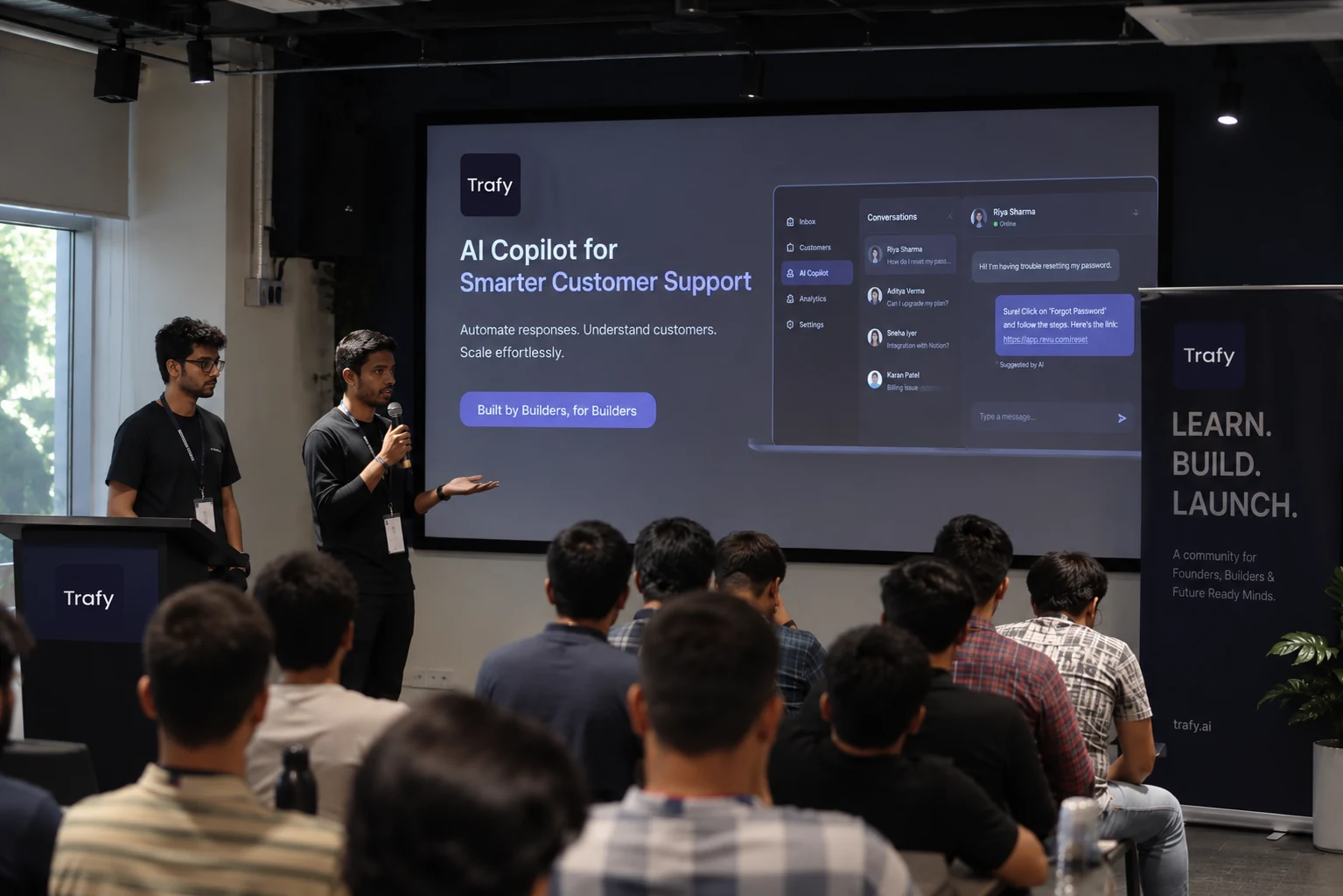
Trafy students presenting their AI product to an audience
04

Present what you built

Demo your app, your repository and your deployment in the final class.

Capstone scorecard
  • AI implementation 25%
  • Backend and functionality 20%
  • Application architecture 15%
  • Deployment and testing 15%
  • Documentation and presentation 15%
  • Problem identification 10%

The stack

Tools you’ll actually use.

The emphasis is on implementing these technologies, not memorising their definitions.

PythonProgramming
VS CodeEnvironment
Google ColabEnvironment
NumPyData analysis
PandasData analysis
MatplotlibData analysis
Scikit-learnMachine learning
LLM APIsLLM integration
REST APIsBackend
FastAPIBackend
StreamlitFrontend
SQLDatabases
PostgreSQLDatabases
FAISSVector databases
ChromaDBVector databases
LangChainAI frameworks
LangGraphAgent workflows
GitVersion control
GitHubVersion control
Cloud hostingDeployment

Beyond the classroom

Learn. Build. Execute. Get discovered.

A

Real product experience

Contribute to Trafy’s networking platform connecting students, professionals, founders, educators and recruiters.

B

Resume sharing with FAANG

Resumes of cohort performers are shared with FAANG companies for consideration.

Does not guarantee interviews, shortlisting or employment.
C

MNC opportunities

Top performers may get opportunities with leading MNCs, subject to selection, eligibility and availability.

D

Investor interactions

Promising product ideas may get a chance to be discussed with investors.

Funding is not guaranteed.
E

Paid internships at Trafy

The top three performers get the opportunity to join Trafy as paid interns, based on performance, project quality, consistency and evaluation.

Learning outcomes

By the end, you’ll be able to…

  1. Write Python programmes independently
  2. Process and analyse datasets
  3. Understand fundamental ML concepts
  4. Train and evaluate basic ML models
  5. Understand LLMs and Generative AI
  6. Integrate AI models through APIs
  7. Build backend applications with FastAPI
  8. Work with SQL and PostgreSQL
  9. Build interactive AI interfaces
  10. Implement embeddings and semantic search
  11. Develop RAG-based applications
  12. Understand AI agents and tool calling
  13. Build multi-step AI workflows
  14. Deploy AI-powered applications
  15. Maintain projects using Git and GitHub
  16. Present and explain your own AI applications

These are intended learning outcomes, not a guarantee of professional mastery or employment after 32 hours of live teaching.

Who should join

Built for beginners and career switchers.

  • Students who want to enter Artificial Intelligence
  • Beginners who have never written code
  • Graduates interested in AI engineering
  • Working professionals exploring AI application development
  • Aspiring founders who want to build AI-powered products
  • Anyone interested in automation, LLMs and intelligent applications
Our promise

We provide the learning environment, technical guidance, practical challenges and opportunities to show your ability. What you build, and how far you take it, depends on your effort and execution.

Questions

Frequently asked questions

Everything about the 8-week AI Engineer Cohort: who it is for, what you build, what is included and how to apply.

The programme

What is the Trafy AI Engineer Cohort?

The Trafy AI Engineer Cohort is an intensive 8-week, instructor-led programme that takes complete beginners from their first lines of Python to building and deploying real AI-powered applications. It is built around building: you complete four practical projects, including an individual capstone, instead of only attending lectures.

Who is this AI course for?

It is designed for students who want to enter Artificial Intelligence, beginners who have never written code, graduates interested in AI engineering, working professionals exploring AI application development, aspiring founders who want to build AI-powered products, and anyone interested in automation, LLMs and intelligent applications.

Do I need coding or AI experience to join?

No. No previous AI or programming experience is required. The curriculum starts from Python fundamentals and progressively introduces more advanced AI engineering concepts.

How long is the cohort and how many classes are there?

The cohort runs for 8 weeks with 2 live classes each week, 16 classes in total. Every class is 2 hours long, which adds up to 32+ hours of live teaching, plus weekly assignments and project work.

Can working professionals join?

Yes. Working professionals who want to explore AI application development are one of the groups the programme is designed for. The form asks whether you are a working professional so a counsellor can guide you.

What equipment do I need?

A laptop or desktop computer with a reliable internet connection is recommended. You will set up Python, VS Code, Google Colab and GitHub in the very first class.

Curriculum and projects

What will I learn in the AI Engineer Cohort?

You learn Python programming, data analysis with NumPy, Pandas and Matplotlib, machine learning with Scikit-learn, generative AI and large language models, prompt engineering and LLM APIs, backend development with FastAPI, SQL and PostgreSQL, Streamlit interfaces, embeddings and vector databases, retrieval-augmented generation (RAG), AI agents and tool calling, workflows with LangGraph, and deployment with Git and GitHub.

What is the week-by-week curriculum?

Week 1: Programming foundations. Week 2: Python and data handling. Week 3: Machine learning foundations. Week 4: Generative AI and LLM engineering. Week 5: AI application development. Week 6: RAG and knowledge-based AI. Week 7: AI agents and automation. Week 8: Deployment and capstone execution. You can download the full topic-by-topic curriculum as a PDF.

What projects will I build?

You build four practical projects: an AI chatbot in Week 4, a full-stack AI application in Week 5, an AI knowledge assistant using RAG in Week 6, and an individual capstone application across Weeks 7 and 8 that you deploy and present.

What is the capstone project and can I choose my own idea?

Every student picks a real problem and builds an AI-powered application for it. Ideas include an AI resume analyzer, study companion, customer support assistant, personal finance assistant, research assistant, document intelligence system or workflow automation application. You can also propose your own idea, subject to mentor approval and realistic scope.

Which tools and technologies are used?

Python, VS Code, Google Colab, NumPy, Pandas, Matplotlib, Scikit-learn, LLM APIs, FastAPI, Streamlit, SQL, PostgreSQL, FAISS, ChromaDB, LangChain, LangGraph, Git, GitHub and cloud hosting platforms. The emphasis is on implementing these tools, not just learning their definitions.

Are the classes live or recorded?

The programme is instructor-led with 32+ hours of live teaching. Each class includes a practical so you build as you learn.

How am I evaluated?

Your evaluation covers attendance, weekly assignments, three projects, the capstone, GitHub contributions and a final presentation. The capstone is scored on AI implementation (25%), backend and functionality (20%), application architecture (15%), deployment and testing (15%), documentation and presentation (15%) and problem identification (10%).

Free access and the Trafy app

What is included for free with the cohort?

Every cohort member gets free access to 30+ courses on the Trafy app, the Trafy Employability Index test, a Trafy profile to showcase their progress, and a GitHub portfolio built from their projects.

What is the Trafy Employability Index?

The Employability Index is a single, verifiable job-readiness score. It combines a 45-question MCQ round on computer science fundamentals, a timed DSA round of 2 problems in 45 minutes, and verification of your portfolio, LinkedIn, LeetCode and GitHub profiles.

What is Trafy?

Trafy is a social networking platform being built to connect students and graduates, working professionals, founders, trainers and educators, and recruiters and hiring teams. Cohort participants can contribute to the Trafy product and see how real technology products are developed.

Careers and opportunities

Does the cohort guarantee a job, internship or interview?

No. Resume sharing, industry opportunities and investor interactions depend on selection, eligibility and performance, and none of them guarantees an interview, a job or funding. Trafy provides the learning environment, technical guidance, practical challenges and opportunities to demonstrate your ability.

Will my resume be shared with companies?

Resumes of cohort performers are shared with FAANG companies for consideration. This gives additional visibility but does not guarantee interviews, shortlisting or employment. Top performers may also get opportunities with leading MNC companies, subject to selection and availability.

Are there paid internships at Trafy?

The top three performers have the opportunity to join Trafy as paid interns. Selection is based on performance, project quality, consistency and evaluation across the programme.

Can I meet investors or build a startup?

Students who develop promising product ideas may get opportunities to interact with investors and discuss their ideas. This is exposure to the startup ecosystem and funding is not guaranteed. Aspiring founders can also explore the Trafy Startup Track.

What will I have at the end of the 8 weeks?

A stronger understanding of AI engineering, four practical projects, an individual capstone application, a GitHub portfolio, experience presenting technical work, a professional Trafy profile, and exposure to opportunities beyond the classroom.

Applying

How do I apply to the AI Engineer Cohort?

Click Apply to the Cohort or Download Curriculum, fill in the short form with your name, email, phone number, graduation year and whether you are a working professional, and a Trafy counsellor will contact you with the next steps.

How do I get the fee and batch details?

A Trafy counsellor shares fee, batch and schedule details with you after you submit the form. Download the curriculum first if you want to review every class before you speak to us.

How can I download the curriculum?

Use any Download Curriculum button on this page, fill in the short form and the full 8-week curriculum PDF downloads instantly.
Ready to build your first AI product?

Join the Trafy AI Engineer Cohort. Eight weeks, 32+ live hours, five real builds.

AI Engineer Cohort 32+ live hours · 5 real builds